
Right-sizing your pickline: The Holy Grail of picking operations
.jpg)
Image: Wikimedia Commons
By Bob C. Kennedy
In Part 1, I described what a broken replenishment operation looks like on the floor. Pickers waiting. Pallets sitting behind empty locations. A supervisor on a walkie-talkie in frantic mode. I called replenishment the picking strategy you forgot to plan for. Now let’s talk about why it’s so hard to get right.
I called it the Holy Grail in Part 1 for a reason. Right-sizing your pickline so that replenishment stays manageable without holding excess inventory at the face is one of the most challenging balancing acts in warehouse operations. There is no magic rule of thumb. Every operation is different. But there are things you have to think through, and if you do them in the right order, you’ll be in a lot better shape than most.
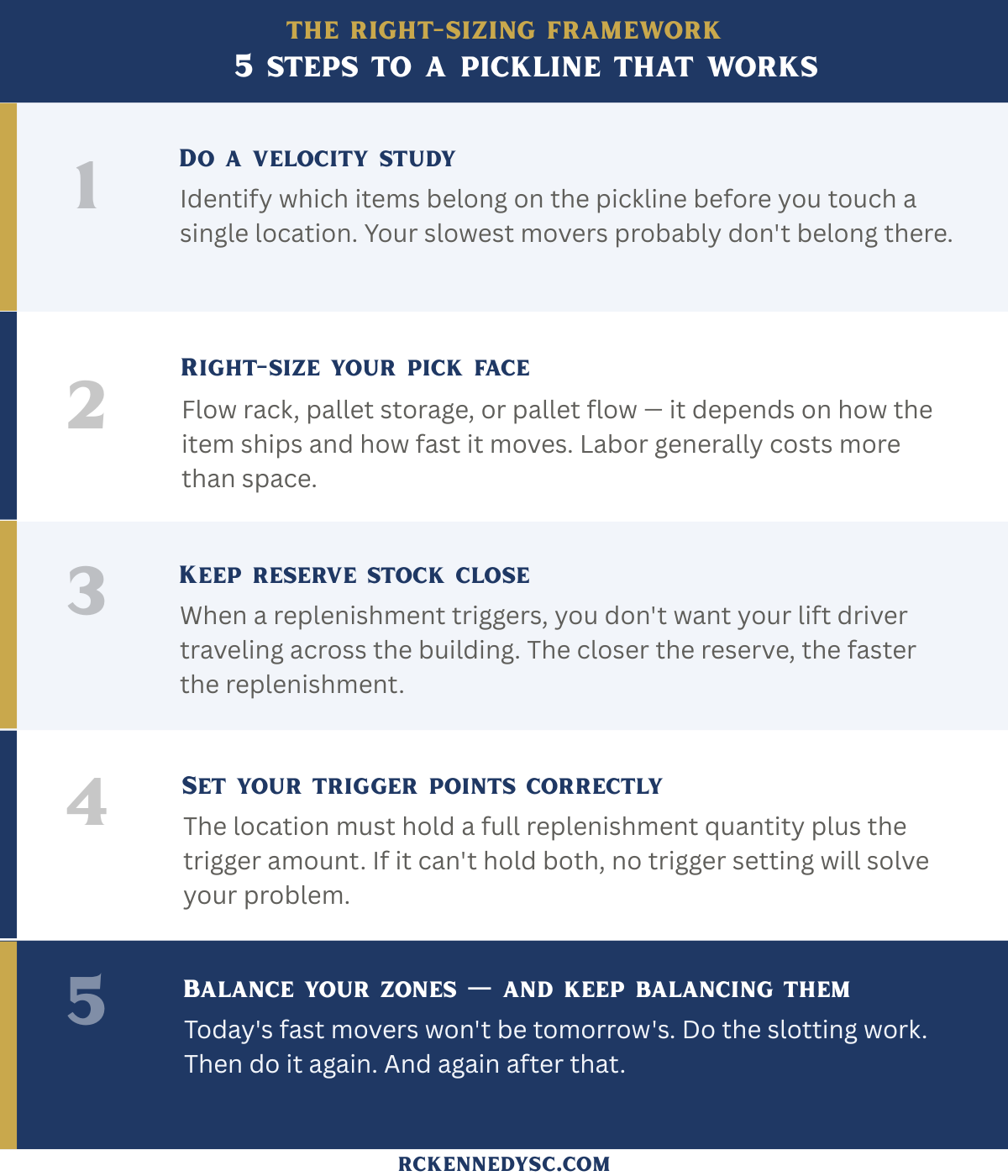
Start with a velocity study
The first thing I tell people: before you touch a single location, do a velocity study on all your items. Which ones move fast? Which ones are slow? Which ones don’t move at all? That analysis determines which items belong on the pickline in the first place — and which ones don’t.
Your slowest movers may not belong on the pickline. They take up space that your fast movers need, and the replenishment burden they create is disproportionate to the volume they generate. Put them somewhere else. Your pickline should be reserved for the items that drive your volume — roughly the top 10 to 20% of your SKUs by movement. Those are the ones worth the investment in face space, zone planning, and replenishment management.
Figure out what kind of pick face each item needs
Once you know which items belong on the pickline, you need to decide how to store them. Flow rack? Pallet storage? Pallet flow? That depends on how the item ships — as eaches, cases, or both — and how fast it moves.
Here’s the thing about fast movers: the faster an item moves, the more space it needs at the pick face. If you underallocate space to a fast mover, you end up dedicating a replenishment person to just that handful of items, running back and forth all day. Labor generally costs more than space. Give your fast movers room.
Keep reserve stock close
I can’t tell you how many operations I’ve walked into where this was overlooked: you need space in the proximity of the pickline to hold reserve inventory. When a replenishment is triggered, you don’t want your lift driver traveling across the building to find it. The closer the reserve, the faster the replenishment, the less your pickers wait. It sounds obvious. It’s amazing how often it isn’t planned for.
Set your trigger points correctly
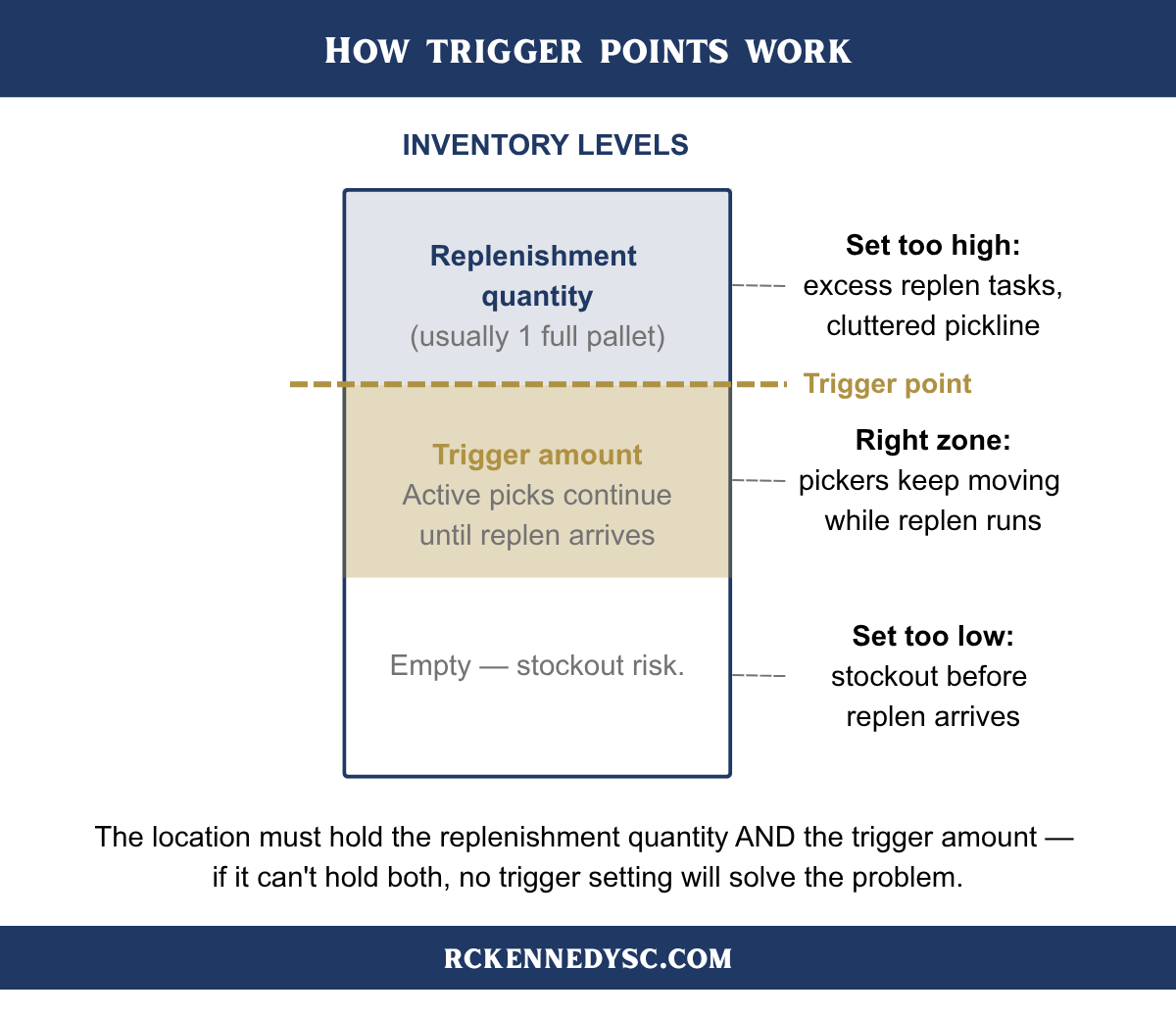
The trigger point is the inventory level at which the WMS creates a replenishment task. Set it too low and you’re already short before the replenishment arrives. Set it too high and you’re generating unnecessary tasks and cluttering the pickline with excess inventory.
The right trigger point accounts for two things: how much inventory you’ll consume between when the trigger fires and when the replenishment actually arrives, and how much physical space the pick location can hold. Specifically, the location needs to hold a full replenishment quantity — usually a full pallet — plus the trigger amount on top of it. If it can’t hold both, you have a space problem that no trigger setting will solve.
Balance your zones — and keep balancing them
You can’t put all your fast movers in the same spot. Your pickers would be stepping on each other. Pick locations should be organized into zones, and the items should be allocated across those zones based on workload balance.
The challenge is that today’s fast movers won’t be tomorrow’s. Businesses change. Seasons change. New SKUs get added constantly — especially in retail and apparel, where the nightmare scenario is a high-SKU, highly seasonal, each-pick operation with a constantly rotating item profile. (That’s a story for another day, but if that describes your operation, you have my sympathy.)
To keep your zones balanced, you have to maintain your slotting on a regular basis. Some operations do this manually using WMS reports. More complex operations rely on slotting software tools, either built into the WMS or available from third parties, that automate the analysis or at least tell you what needs to move.
The most common mistake
I’ve walked into a lot of operations where the pickline was set up reasonably well at first and then slowly fell apart. The culprit, almost every time: poor slotting maintenance. They did the initial work, got the zones balanced, and then stopped. Items that were fast movers became slow movers. New fast movers landed in whatever space was available. Over time the whole thing drifts, and with it the replenishment burden grows.
Do the slotting work. Then do it again. And again after that.
So what’s the simplest fix?
There is simple and then there is impactful.
The simplest fix is adjusting your trigger points. That takes about 30 seconds per location and can meaningfully change the timing and frequency of your replenishments. It’s not a permanent solution but it buys you time.
The most impactful fix is moving slow movers off the pickline. They’re taking up space that your fast movers need, and every time a replenishment runs to a slow mover, that’s a trip that didn’t need to happen. Clean up the pickline and the replenishment workload drops immediately.
Neither of those is the Holy Grail. The Holy Grail is building the whole thing right from the start and then staying disciplined about keeping it that way. It’s not complicated. It just takes work.
If you want to work through this for your operation, RC Kennedy Consulting can help. We cover everything from pickline design to WMS vendor evaluation — including the questions most companies forget to ask. Reach out to start a conversation.